Convert a CER Certificate to CRT with OpenSSL


Convert a CER Certificate to CRT with OpenSSL
One important thing to understand is that a CER certificate can be encoded in either PEM or DER format. DER is a binary format, while PEM is a base64-encoded format.
The .cer extension simply means “certificate.” You might also encounter files with .cer or .cert extensions.
Convert to CRT with OpenSSL
To convert a .cer certificate to .crt using OpenSSL, you need to use the following command:
openssl x509 -inform DER -in myCertificate.cer -out myCertificate.crt
If you encounter an error, it’s possible that your certificate is encoded in PEM. You then have two options: either regenerate a .cer certificate encoded in DER, or use the following command:
openssl x509 -inform PEM -in myCertificate.cer -out myCertificate.crt
Tip:
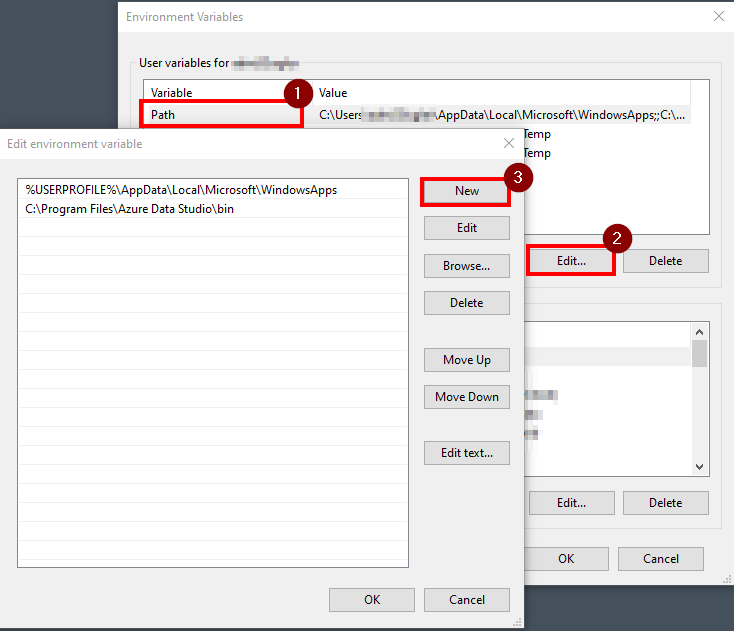
To use the “openssl” command directly, you need to add the “bin” folder of your OpenSSL installation to your system’s PATH environment variable.
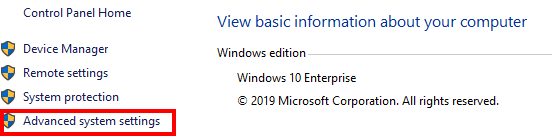
Go to => Control Panel\System and Security\System
Click on “Advanced system settings.”
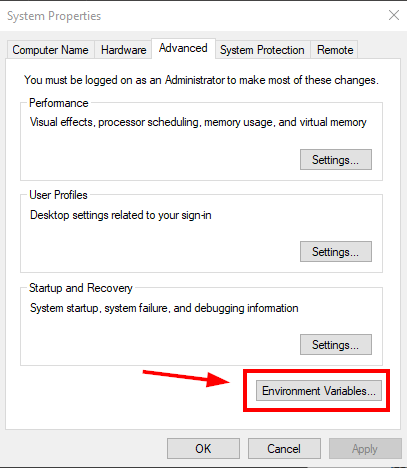
Then “Environment Variables…”
And add the path to the “bin” folder of your OpenSSL installation.
That’s it! Enjoy!